
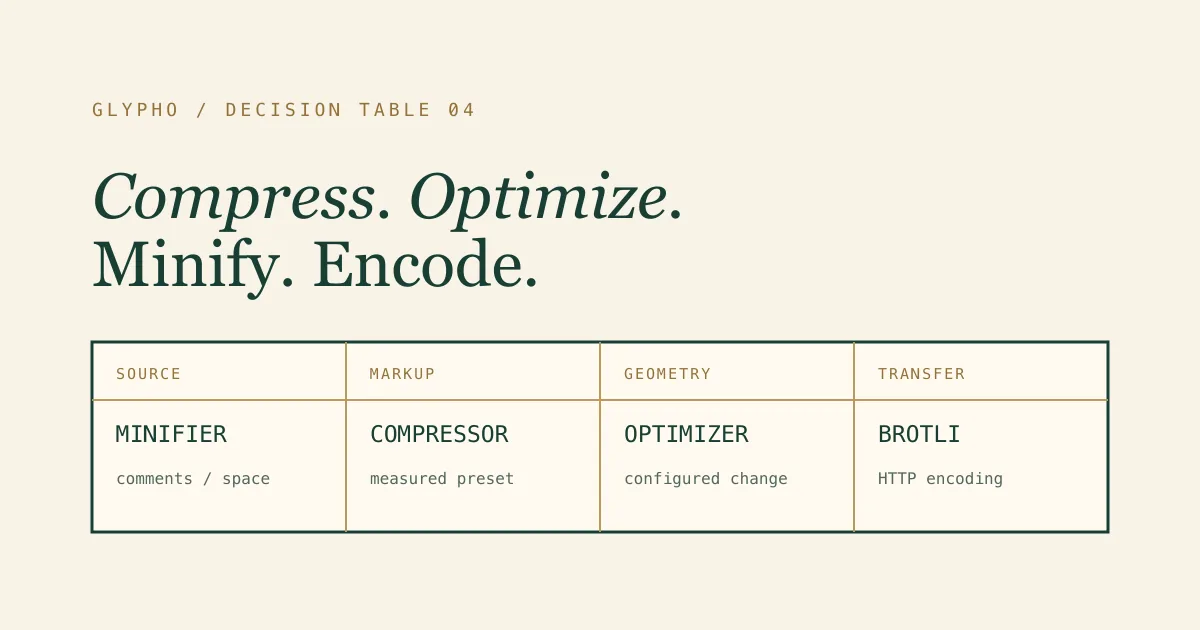
“SVG compressor,” “SVG optimizer,” and “SVG minifier” are often used for the same search intent, but the underlying operations are not identical. One tool may remove editor metadata, another may rewrite path geometry, and a server may apply Brotli without changing the SVG source at all. Calling all three “compression” makes it difficult to choose a safe workflow.
This guide does not argue that one label owns the market. It maps each term to the job it usually describes, the risks it introduces, and the point where it belongs in delivery. Product pages can use familiar language while engineering teams remain precise about behavior.
The short decision table
| Term | What changes | Typical goal | Main review |
|---|---|---|---|
| SVG compressor | Usually markup and sometimes geometry; meaning depends on the tool | Smaller SVG file with a measured before-and-after result | Inspect presets, visual output, IDs, accessibility, and warnings |
| SVG optimizer | Structure, attributes, definitions, paths, transforms, or colors through configured transformations | Remove unnecessary work while preserving intended rendering and behavior | Review every enabled transformation and integration contract |
| SVG minifier | Formatting, comments, optional syntax, and other textual overhead | Produce compact source without broad semantic redesign | Confirm the minifier does not cross into risky optimization |
| SVGO | Whatever an explicit SVGO plugin configuration requests | Automate repeatable SVG transformations in browser, CLI, or build tools | Pin version, list plugins, test fixtures, and inspect diffs |
| Gzip or Brotli | Transfer representation; original SVG is restored before parsing | Reduce network or storage bytes through general-purpose encoding | Verify server headers, CDN behavior, and compressed size |
| SVGZ | A gzip-compressed SVG file | Store or deliver a pre-compressed SVG artifact | Confirm consumer support and correct content handling |
The boundaries overlap. A compressor may call SVGO, a minifier may remove metadata, and an optimizer may report transfer size. The implementation and configuration are more trustworthy than the button label.
What people usually mean by SVG compressor
A compressor is commonly a user-facing tool that accepts a file or pasted markup and returns a smaller SVG. The interface emphasizes original bytes, optimized bytes, percentage saved, preview, copy, and download. It may provide presets rather than exposing dozens of individual transforms.
That product shape is useful for occasional work. A designer can inspect one export without installing a CLI, and a developer can compare two presets before committing an asset. The key question is what the compressor runs. Does it only remove comments and metadata? Does it round path coordinates? Does it rename IDs? Does it execute in the browser or upload files?
A good compressor names its boundaries, displays real results, reports warnings, and refuses unsafe resources. It should not promise a universal percentage because SVG structure varies widely.
What an SVG optimizer does
Optimization is the broadest term. An optimizer may remove redundant structures, merge paths, collapse groups, convert shapes, compact transforms, deduplicate definitions, round values, or rewrite colors. Some changes are conservative; others can affect appearance, semantics, editability, or code integration.
Optimization can target more than bytes. Removing unnecessary filter work may improve rendering. Replacing repeated geometry with reuse may improve maintainability. Keeping IDs stable may be more valuable than an extra percent of size reduction. The “best” output depends on the delivery contract.
Because the scope is broad, configuration matters. A preset designed for anonymous decorative illustrations may be unsafe for an accessible icon whose ARIA references depend on IDs. An optimizer is not inherently aggressive or safe; the enabled transformations decide.
What minification means
Minification usually focuses on textual representation. It removes comments, metadata, whitespace, redundant separators, and verbose syntax while trying not to redesign the document. In practice, tools sometimes use “minify” for numeric rounding or path compaction too, so verify behavior.
Minification is attractive because its diff is easier to reason about. Deleting indentation and editor comments normally carries less visual risk than merging paths. It can be the right default for source that contains complex animation, CSS, IDs, or downstream editing requirements.
The tradeoff is readability. A fully single-line SVG is harder for humans to review, and Gzip or Brotli may already compress whitespace efficiently in transfer. If developers routinely edit the asset, a moderately formatted source plus server encoding can be better than maximum textual density.
SVGO is an engine, not a single behavior
SVGO is a library and CLI that applies plugins to SVG. Saying “we use SVGO” does not describe the result any more than saying “we use a compiler” describes optimization flags. The version, plugin list, parameters, and order are part of the behavior.
An explicit configuration is easier to audit than a hidden default preset. Teams can protect viewBox, IDs, titles, descriptions, classes, styles, masks, gradients, animation, and hooks while enabling selected cleanup. Fixture tests can prove those contracts across upgrades.
Pin the SVGO version in the lockfile and review release notes before changing it. Run the same corpus with the new version, compare bytes and output, then inspect assets that rely on less common SVG features. Do not assume a major upgrade is a formatting-only change.
Gzip and Brotli do not optimize SVG structure
Gzip and Brotli are general-purpose compression formats. A server or CDN encodes the SVG response; the browser decodes it before parsing the original XML. IDs, paths, comments, and whitespace all reappear exactly as they were.
This makes transfer compression semantically safe when configured correctly, but it does not remove repository bytes, embedded raster cost after decoding, parse complexity, or unnecessary DOM structure. It also does not sanitize scripts or external resources.
Brotli often produces smaller text transfers than Gzip at suitable settings, while Gzip has broad support and fast tooling. Measure the actual response, including headers and cache behavior. Do not compare a raw optimized file with a Gzipped original and call the difference an optimizer result; those are different layers.
What SVGZ changes
SVGZ is an SVG compressed with Gzip and commonly stored with an .svgz extension. It can reduce stored bytes, but support across browsers, CDNs, design tools, email clients, and asset pipelines may be less predictable than serving a normal SVG with HTTP content encoding.
Correct MIME type and encoding behavior matter. A server that compresses an already compressed SVGZ again wastes work, while a consumer that does not decode it will fail. Cache keys and content negotiation add operational details.
Use SVGZ when a controlled target explicitly supports it. For general websites, a plain .svg with reviewed source and server Gzip or Brotli is often simpler.
Online tool or CLI pipeline
An online interface is useful for one-off inspection, designers, support teams, and files that need visual comparison. Prefer browser-local processing for sensitive or unpublished assets. Confirm file limits, presets, warnings, preview behavior, and whether data leaves the device.
A CLI is better for repeated builds, large asset sets, deterministic pull requests, and CI. Configuration can live in source control, versions can be pinned, and regression fixtures can run on every change. The risk is silent bulk transformation if the configuration is not reviewed.
Many teams use both: an online tool for exploration and measured review, then a pinned CLI for approved automation. The outputs should share a documented configuration or, at minimum, clearly state how they differ.
Safe and Balanced are policy names
A preset name is a promise made by one product, not an industry standard. “Safe” should describe preserved contracts and conservative transformations. “Balanced” should identify the additional byte-saving operations and the checks they require. Another tool may use those words differently.
In GlyPho, Safe removes selected editor and formatting residue while preserving viewBox, IDs, classes, title, description, ARIA, styles, masks, gradients, animation, and code hooks. Balanced adds numeric, color, path, and transform cleanup. Neither preset uses cleanup IDs or a hidden catch-all default.
You can compare them in the browser-local SVG compressor. Read the result as a measurement for one file, not a universal ranking of “compressor” versus “optimizer.”
A measured nearly optimized fixture
The repository’s already-optimized.svg fixture is deliberately small. Running it through the production Safe preset measured 57 bytes before and 56 bytes after. The result saved one byte, about 1.75 percent, returned no warning, and remained valid SVG.
This example prevents a terminology discussion from turning into a marketing promise. A compressor can correctly report almost no saving. An optimizer can decide there is little safe work left. A minifier can remove one redundant character. Gzip or Brotli may still reduce transfer bytes through encoding.
The risk check passed because the output preserved the compact viewBox and path, not because the percentage was impressive. Truthful no-op and near-no-op behavior is part of a reliable tool.
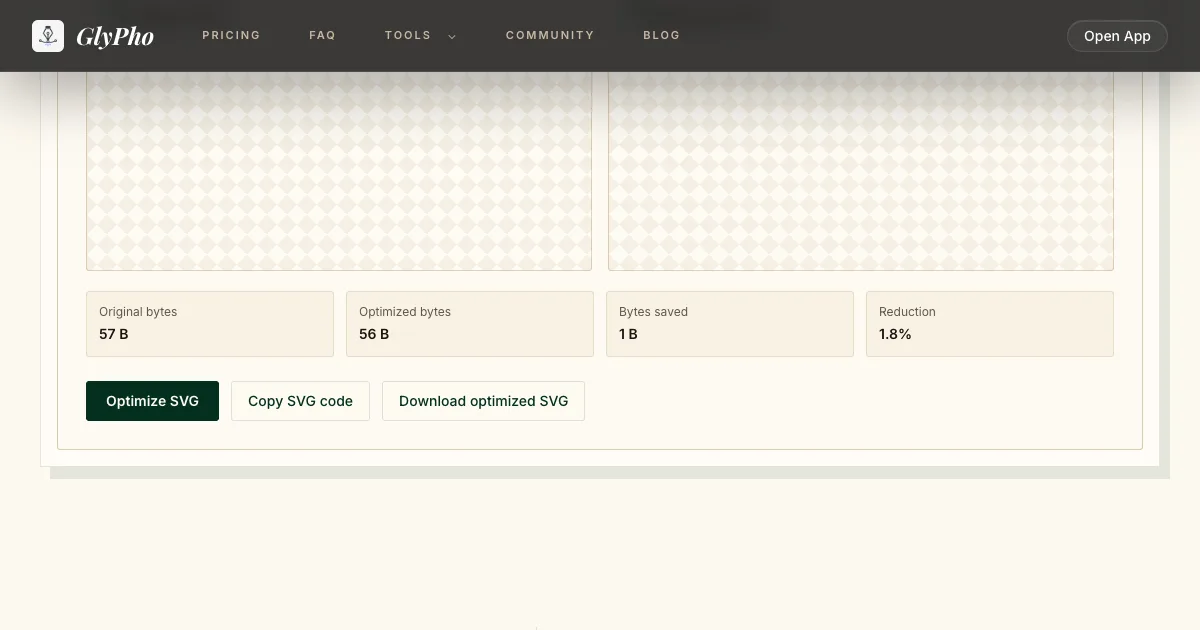
Real Safe run: already-optimized.svg went from 57 B to 56 B.
Choose by the source of the SVG
For a Figma export, first clean the design frame, hidden layers, masks, gradients, and text. Then run conservative markup cleanup and test ID collisions. The editor source remains authoritative.
For an AI-generated SVG, validate active and external content, inspect provenance, review geometry, define accessibility, and decide whether regeneration is better than repair. Optimization is a later mechanical step and is not itself AI.
For a hand-authored component, preserve readability and code hooks. A build-time minifier with a small plugin list may be more appropriate than an interactive compressor. For a large icon library, use a pinned CLI and representative fixtures.
For a static third-party asset, confirm rights and sanitize it before optimizing. Smaller malicious markup is still malicious.
Choose by embedding method
An <img> isolates the SVG document, which reduces ID collision concerns. It supports caching and lazy loading, but outside CSS cannot reach internal paths. Accessibility usually comes from the HTML alt contract.
Inline SVG enables styling, animation, and direct semantics, but joins the surrounding DOM. IDs can collide, classes can inherit unexpected rules, and duplicated markup may increase HTML. Optimization must preserve hooks and references.
CSS backgrounds suit decorative imagery but do not provide semantic content. Sprites and symbols improve reuse but introduce reference and styling rules. The same source file can need a different optimization policy for each method.
Choose by risk, not only bytes
Low-risk candidates include comments, editor metadata, unused namespace declarations, and formatting. Medium-risk changes include numeric rounding, color conversion, and transform compaction. Higher-risk changes include ID cleanup, path merging, shape conversion, style inlining, definition reuse, and filter rewrites.
The exact risk depends on the asset. Numeric cleanup is routine for a large background but sensitive for a tiny logo. ID cleanup may be harmless for an isolated decorative image but catastrophic for an inline accessible icon. Establish categories based on your corpus.
Record warnings and failures. Reject unsafe external resources. If a transformation cannot prove it retained a contract, disable it or add a focused test before scaling it across assets.
Measure the layers separately
Record raw source bytes, optimized raw bytes, Gzip bytes, Brotli bytes, and, when relevant, bundle or HTML impact. This prevents teams from mixing distinct wins. A 40 percent raw reduction may become a small transfer change after Brotli; a small raw change may still improve repository churn or parse complexity.
Measure render performance only when the structure is complex enough to matter. Path count, filter area, and DOM nodes can influence rendering independently of file size. Use browser profiling rather than assuming the smallest file paints fastest.
Also measure human cost. A configuration that saves ten bytes but makes every brand asset unreadable may not be worthwhile. Production optimization balances network, rendering, maintenance, and correctness.
A practical selection sequence
First identify the source and editable authority. Second identify the embedding method and behavior contracts. Third validate security and external resources. Fourth record raw bytes. Fifth run a conservative preset or minifier and compare visual and semantic behavior. Sixth consider broader optimization only if the additional saving matters.
Then enable Gzip or Brotli at the server, verify response headers, and measure transfer. Use a CLI in CI when the workflow repeats; use a browser-local tool when a person needs to inspect one file. Adopt SVGZ only for a controlled consumer that expects it.
Finally, document the configuration and keep representative fixtures. Terminology can remain flexible in user-facing copy, but the pipeline must be exact.
Related workflows
For a preservation-first walkthrough, read how to reduce SVG file size without breaking the design. For editor-specific cleanup, use the Figma SVG export guide. For generated artwork, follow the AI-generated SVG production checklist.