
An AI-generated SVG can be a useful design draft, but “valid XML” is not the same as “ready for production.” A generated file may contain plausible-looking paths, excessive precision, repeated shapes, disconnected groups, generic IDs, embedded raster data, or code whose origin is difficult to explain. The preview may be attractive while the structure is awkward to maintain.
This guide treats generation and optimization as separate systems. The generator proposes artwork. A deterministic optimizer removes selected markup overhead. Neither step replaces a product review, security boundary, accessibility decision, or ownership check. Production readiness comes from the workflow around the file.
Decide whether the image should be regenerated
Start with the visual idea, not the code. If the silhouette is wrong, the composition is confused, or the prompt missed the product context, regenerate or revise the artwork. Optimization cannot turn an unsuitable concept into a good design. It can only transform the SVG it receives.
Regenerate when geometry is visibly broken, repeated attempts have created tangled paths, text is misspelled, or the file contains a large embedded bitmap where editable vector output was required. A fresh prompt with clearer constraints may be cheaper and safer than manually repairing hundreds of points.
Optimize when the visual direction is approved and the remaining issues are mechanical: comments, metadata, verbose numeric values, unnecessarily long path syntax, or transforms that a known preset can compact. The dividing line is intent. If a human must decide what the shape should be, return to design. If the intended shape is already known, measured cleanup may help.
Preserve the prompt, output, and review record
Keep the original generated file before editing. Record the prompt or input that produced it, the generation date, model or service if policy permits, and the person who approved the result. This is useful for reproducibility and for answering provenance questions later.
Do not claim that an optimizer can determine whether training data, trademarks, or third-party artwork influenced the output. Those questions require product policy, legal judgment, and sometimes human research. Optimization changes markup; it does not grant rights.
Store the reviewed delivery copy separately from the raw result. If a later optimizer version changes behavior, the team can compare both artifacts and rerun the process intentionally.
Inspect the SVG as code
Open the generated file in a text editor. Confirm there is one SVG root, a sensible viewBox, and no unexpected document wrapper. Count groups, paths, definitions, masks, clip paths, filters, images, and text elements. Search for script, event attributes, external URLs, relative resources, and embedded data.
Look at IDs and class names. Generated names such as layer_1, paint0, or random hashes can be acceptable inside an isolated image, but they may collide when multiple SVGs are inlined. Meaningful hooks are valuable when application code or CSS needs to target a region. Rename only with all references updated.
Read the path data at a structural level. Thousands of digits for a simple icon suggest unnecessary precision or noisy geometry. Many overlapping shapes may indicate the generator simulated shading with layers. Those patterns affect maintainability and render cost even if network compression reduces transfer bytes.
Validate external and active content
Treat generated markup as untrusted input until it passes validation. Reject remote stylesheets, network image URLs, protocol-relative resources, relative resource paths, and JavaScript URLs unless a tightly controlled product requirement explicitly allows them. External references can leak requests, fail offline, or change after review.
Scripts and event handlers do not become safe because they were generated. A production pipeline for static artwork should remove active script content and report the change. If interaction is required, implement it in reviewed application code where permissions, lifecycle, and testing are visible.
Embedded data:image resources also deserve attention. They may be legitimate, but they turn part of the SVG into raster content and can dominate file size. Verify the media type, rights, resolution, and whether an external optimized asset would be more appropriate.
Compare geometry with the requested design
Render the file on several backgrounds and at actual product sizes. AI output often hides rough joins, self-intersections, tiny gaps, or inconsistent corner radii that are invisible in a large preview. Zoomed inspection and small-size inspection reveal different problems.
Check symmetry only where symmetry was intended. Generated art may contain subtle variation that gives it character; an automatic path simplifier should not erase deliberate irregularity. Conversely, a system icon may need strict optical consistency that the generator did not supply.
If cleanup requires substantial node editing, return to a vector editor and save a curated source. At that point the file is no longer merely a generated output; it is a designed asset with human decisions that deserve an editable master.
Establish accessibility semantics
Decide whether the SVG conveys information or decorates nearby content. Informative inline SVG may need a meaningful title and description connected through ARIA. Decorative SVG should be hidden from assistive technology or use an empty HTML alternative in the appropriate embedding context.
Generated titles such as “AI image” or filenames are rarely useful accessible names. Write semantics based on the product task. A status icon might need “Payment verified,” while an illustration next to a heading may require no repeated announcement.
After optimization, inspect the accessibility tree and confirm any aria-labelledby or aria-describedby references still resolve. Accessibility is not a prompt adjective; it is a testable relationship in the final page.
Create stable code hooks deliberately
If the application changes colors, animates a region, or attaches analytics to a group, define stable classes or data attributes before optimization. Do not depend on the generator’s arbitrary group order or autogenerated IDs. Document every hook as part of the component interface.
Keep hooks minimal. Adding an ID to every path creates another maintenance burden and prevents some safe transformations. Expose only the regions the application genuinely controls, such as data-part="spark" or a class used for theme color.
Test the optimized asset with the actual CSS and component code. A standalone preview cannot prove that a selector, animation target, or event boundary survived.
Choose a preset based on risk
Start with Safe when the file includes accessibility references, CSS, animation, masks, gradients, or hooks. Safe cleanup targets editor residue and formatting while preserving those structures. It gives the reviewer a smaller, more understandable diff.
Balanced adds numeric cleanup, path and transform compaction, and color conversion. It is often useful for verbose generated geometry, but its value depends on the shape. Compare small curves, sharp corners, repeated motifs, and brand marks before accepting the result.
Use the local SVG compressor and optimizer to run both presets and see exact UTF-8 bytes. The compressor is deterministic and uses an explicit plugin list. It is not an AI system, does not reinterpret the prompt, and does not decide whether the design is good.
Measured AI-generated fixture
We ran the repository’s ai-generated.svg fixture through the production Balanced preset. The source measured 306 bytes and the output measured 156 bytes, saving 150 bytes, or about 49.02 percent. The optimizer returned no warnings and the result began with a valid SVG root.
The risk check also compared Balanced with Safe, verified that the Balanced output was smaller, and reran validation on the optimized markup. This fixture was intentionally constructed with verbose geometry and metadata, so it is a useful regression example rather than an average performance claim.
A generated illustration with many necessary paths may save far less. An already compact icon may barely change. Report the result for the file you tested, not a generalized “AI compression rate.”
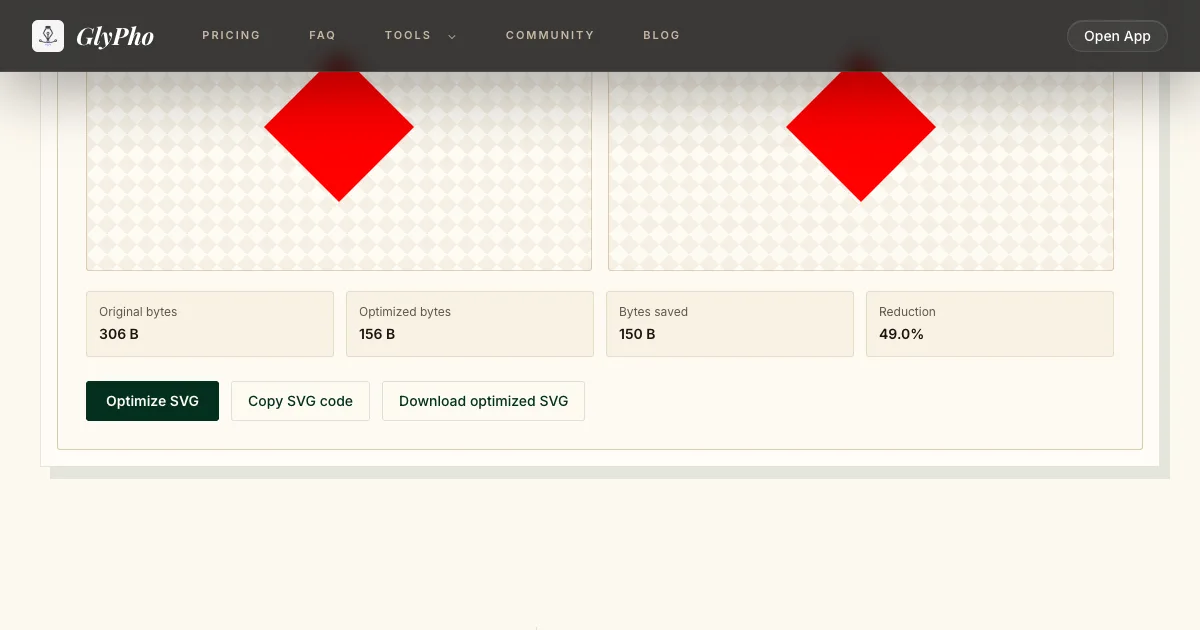
Real Balanced run: ai-generated.svg went from 306 B to 156 B.
Review numerical precision without chasing zeros
Generated coordinates sometimes carry six or more decimal places even though the visual occupies a small viewBox. Reducing precision can save bytes, but the acceptable threshold depends on scale. A difference of 0.001 in a 24-unit icon is more visible than the same difference in a 2000-unit illustration.
Test at the smallest intended render size and at high zoom. Watch narrow gaps, aligned edges, circular arcs, and control points near a cusp. A raw byte reduction is not worthwhile if it introduces a seam or changes optical balance.
Do not round values by global search and replace. Path syntax, transforms, gradients, and filter parameters have different contexts. Use a tested parser and explicit preset, then compare the result.
Evaluate repeated shapes and reuse
AI output may draw the same star, dot, or leaf many times as separate paths. Replacing copies with a symbol and use can reduce markup and make global edits easier. It can also complicate styling, accessibility, and interoperability with design tools.
Make reuse a conscious refactor after visual approval. Give the symbol a stable coordinate system, test transforms on each instance, and confirm browser and downstream-tool support. If each copy has slightly different geometry, forcing reuse may erase meaningful variation.
For React components, code-level composition may be clearer than embedding a complex symbol system in one file. Choose the boundary that the team can maintain.
Check color and theme behavior
List every fill, stroke, gradient stop, and opacity. Generated files often hard-code similar but inconsistent colors. Decide whether those differences are intentional. Consolidating a palette is a design decision, not automatic compression.
If the asset should follow interface color, replace an approved flat color with currentColor and test contrast across themes and states. Do not apply currentColor to a multicolor illustration simply to reduce hex values. For gradients, verify that IDs, transforms, and stops survive.
Check forced-colors mode and high-contrast themes when the asset communicates state. A beautiful generated icon that disappears for some users is not production ready.
Test animation and motion preferences
Generated SVG may include SMIL or CSS animation, sometimes unexpectedly. Inspect timing, repeat behavior, target references, and CPU cost. Remove motion that was not requested. If motion is useful, respect reduced-motion preferences in the surrounding component.
Optimization must preserve intentional animation targets and styles. Compare more than the first frame: watch a complete loop, pause and resume behavior, and theme changes during animation. If scripts control animation, move that logic into reviewed application code.
Static marketing artwork usually does not need embedded interaction. Simpler files are easier to audit and safer to cache.
Integrate the asset like application code
Place the optimized SVG in the actual route or component. Verify CSP behavior, cache headers, dimensions, lazy loading where appropriate, and server transfer compression. Test two instances on one page for ID collisions. Confirm that the asset does not initiate unexpected network requests.
Add a visual regression for brand-critical artwork and a DOM contract test for critical IDs or ARIA relationships. Avoid snapshotting the entire minified path string; that creates noisy tests. Protect the behavior that would be costly to break.
Record the original and optimized byte counts in the pull request. Reviewers can then see why the asset changed and which checks support acceptance.
Know what the optimizer does not do
It does not judge originality, verify licenses, approve trademarks, repair a weak composition, or determine whether generated text is correct. It does not make a raster image into true vector paths. It does not promise that every consumer understands every SVG feature.
It also does not use AI. The production compressor applies a fixed validation boundary and explicit SVGO plugin lists. Keeping that distinction clear prevents a tooling label from substituting for review.
When the artwork itself is wrong, regenerate or redesign. When the code is unsafe, reject it. When semantics are missing, author them. Optimize only after those decisions.
Production handoff checklist
Preserve the raw output and prompt record. Confirm rights and product policy outside the optimizer. Inspect the root, viewBox, paths, groups, definitions, images, external references, scripts, and handlers. Approve geometry at target sizes. Define accessibility and stable hooks. Start with Safe, then compare Balanced if justified.
Record measured bytes and warnings, compare visual and semantic behavior, test duplicate inline instances, themes, animation, CSP, and transfer compression. Store the reviewed delivery copy separately and document the preset.
For the general preservation sequence, read how to reduce SVG size safely. If the source is a design editor rather than a generator, use the Figma export optimization workflow. To choose among compression, optimization, minification, SVGO, and HTTP encoding, use the SVG terminology decision guide.